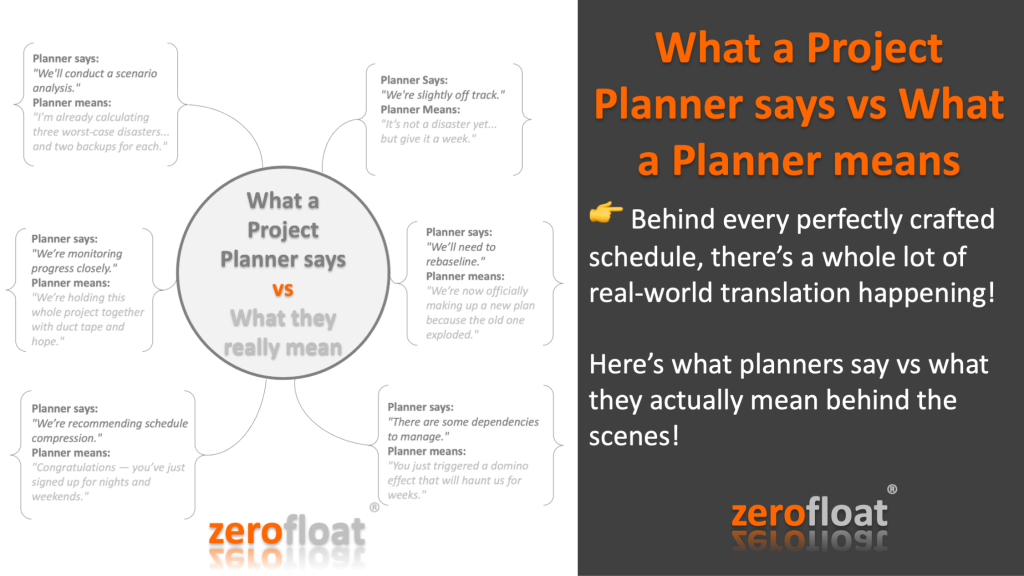
What a Project Planner says vs What a Planner means

“What a Project Planner says vs What a Planner means”…

If you’re a project planner, you KNOW these translations are (almost) true…

Behind every perfectly crafted schedule, there’s a whole lot of real-world translation happening!

Here’s what planners say vs what they actually mean behind the scenes!
…
Planner says:
“We’re slightly off track.”
Planner means:
“It’s not a disaster yet… but give it a week.”
…
Planner says:
“We’ll need to rebaseline.”
Planner means:
“We’re now officially making up a new plan because the old one exploded.”
…
Planner says:
“There are some dependencies to manage.”
Planner means:
“You just triggered a domino effect that will haunt us for weeks.”
…
Planner says:
“We’re recommending schedule compression.”
Planner means:
“Congratulations — you’ve just signed up for nights and weekends.”
…
Planner says:
“We’re monitoring progress closely.”
Planner means:
“We’re holding this whole project together with duct tape and hope.”
…
Planner says:
“We’ll conduct a scenario analysis.”
Planner means:
“I’m already calculating three worst-case disasters… and two backups for each.”
…

Tag a planner who’s a master of ‘project code’! What’s your favourite secret translation? Drop your thoughts below and feel free to repost.

Need help? Explore how zerofloat can help you control your project.


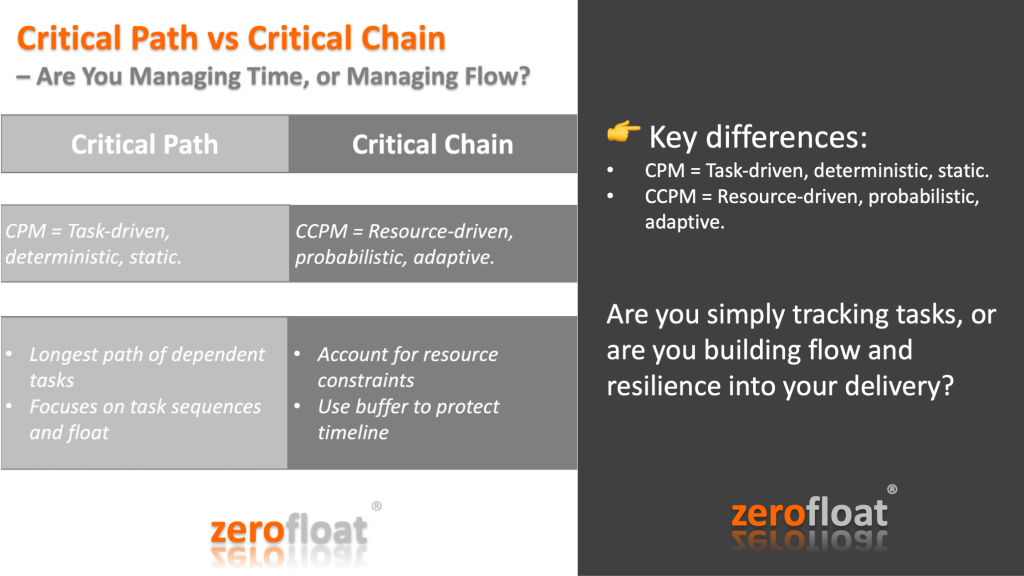
Critical Path vs Critical Chain

Critical Path vs Critical Chain: Are You Managing Time, or Managing Flow?

In the world of project controls, two terms often pop up when it comes to scheduling: Critical Path Method (CPM) and Critical Chain Project Management (CCPM). While both aim to keep projects on track, they tackle the problem from very different angles.

Critical Path focuses on the longest path of dependent tasks—delays here directly impact the project end date. It’s all about identifying task sequences and managing float (or the lack of it).

Critical Chain, on the other hand, brings in a human element—acknowledging resource constraints and the tendency to pad task durations. Instead of stacking buffers throughout the schedule, CCPM pulls them together at key points, protecting the project timeline with smarter focus and less multitasking.

Key differences:
CPM = Task-driven, deterministic, static.
CCPM = Resource-driven, probabilistic, adaptive.

At zerofloat, we often ask clients:
Are you simply tracking tasks, or are you building flow and resilience into your delivery?

Which method has worked better for you in real-world projects—and why?

Let’s compare notes in the comments.

Drop your thoughts below and feel free to repost.

Need help? Explore how zerofloat can help you control your project.


Ten Best Practices for Schedule

The ten best practices associated with a high-quality and reliable schedule and their concepts are as follows.

1. Capturing all activities. The schedule should reflect all activities as defined in the program’s work breakdown structure (WBS), which defines in detail the work necessary to accomplish a project’s objectives, including activities both the owner and the contractors are to perform.

2. Sequencing all activities. The schedule should be planned so that critical program dates can be met. To do this, activities must be logically sequenced and linked—that is, listed in the order in which they are to be carried out and joined with logic. In particular, a predecessor activity must start or finish before its successor. Date constraints and lags should be minimized and justified. This helps ensure that the interdependence of activities that collectively lead to the completion of activities or milestones can be established and used to guide work and measure progress.

3. Assigning resources to all activities. The schedule should reflect the resources (labour, materials, travel, facilities, equipment, and the like) needed to do the work, whether they will be available when needed, and any constraints on funding or time.

4. Establishing the duration of all activities. The schedule should realistically reflect how long each activity will take. When the duration of each activity is determined, the same rationale, historical data, and assumptions used for cost estimating should be used. Durations should be reasonably short and meaningful and should allow for discrete progress measurement. Schedules that contain planning and summary planning packages as activities will normally reflect longer durations until broken into work packages or specific activities.

5. Verifying that the schedule can be traced horizontally and vertically. The schedule should be horizontally traceable, meaning that it should link products and outcomes associated with other sequenced activities. Such links are commonly referred to as “hand-offs” and serve to verify that activities are arranged in the right order for achieving aggregated products or outcomes. The schedule should also be vertically traceable— that is, data are consistent between different levels of a schedule. When schedules are vertically traceable, lower-level schedules are clearly consistent with upper-level schedule milestones, allowing for total schedule integrity and enabling different teams to work to the same schedule expectations.

6. Confirming that the critical path is valid. The schedule should identify the pro- gram’s critical path—the path of the longest duration through the sequence of activities. Establishing a valid critical path is necessary for examining the effects of any activity’s slipping along this path. The program’s critical path determines the program’s earliest completion date and focuses the team’s energy and management’s attention on the activities that will lead to the project’s success.

7. Ensuring reasonable total float. The schedule should identify reasonable total float (or slack)—the amount of time a predecessor activity can slip before the delay affects the program’s estimated finish date—so that the schedule’s flexibility can be determined. The length of delay that can be accommodated without the finish date’s slipping depends on the number of date constraints within the schedule and the degree of uncertainty in the duration estimates, among other factors, but the activity- ty’s total float provides a reasonable estimate of this value. As a general rule, activities along the critical path have the least total float. An unreasonably high total float on an activity or path indicates that schedule logic might be missing or invalid.

8. Conducting a schedule risk analysis. A schedule risk analysis starts with a good critical path method schedule. Data about program schedule risks are incorporated into a statistical simulation to predict the level of confidence in meeting a program’s completion date; to determine the contingency, or reserve of time, needed for a level of confidence; and to identify high-priority risks. Programs should include the results of the schedule risk analysis in constructing an executable baseline schedule.

9. Updating the schedule using actual progress and logic. Progress updates and logic provide a realistic forecast of start and completion dates for program activities. Maintaining the integrity of the schedule logic is necessary to reflect the true status of the program. To ensure that the schedule is properly updated, people responsible for the updating should be trained in critical path method scheduling.

10. Maintaining a baseline schedule. A baseline schedule is the basis for managing the program scope, the time period for accomplishing it, and the required resources. The baseline schedule is designated the target schedule and is subjected to a configuration management control process. Program performance is measured, monitored, and reported against the baseline schedule. The schedule should be continually monitored so as to reveal when forecasted completion dates differ from baseline dates and whether schedule variances affect downstream work. A corresponding basis document explains the overall approach to the program, defines custom fields in the schedule file, details ground rules and assumptions used in developing the schedule, and justifies constraints, lags, long activity durations, and any other unique features of the schedule.

The ten best practices represent the key concepts of a reliable schedule. These best practices are in no particular order; they are not intended as a series of steps for developing the schedule.

Source: GAO-16-89G, Schedule Assessment Guide: Best Practices for Project Schedules

Need help? Explore how zerofloat can help you control your project.

DCMA 14-point Schedule Assessment

DCMA 14-point Schedule Assessment is a project management guideline established on 14 metrics that provide the possibility to make a qualitative and quantitative evaluation of the schedule. The DCMA (Defense Contract Management Agency) introduced it in 2005 to ensure projects worth over 20 million dollars were following best practice guidelines in the US Defence Department.

The DCMA 14-Point Assessment

1. Logic – Is the schedule logical? Schedule logic involves scheduling tasks; Are all the predecessor, and successor tasks concurrent? Missing links need to be resolved because without schedule logic an accurate Critical Path will not be possible. The number of activities that are missing a predecessor, a successor or both should not exceed 5% of the activities within the schedule.

2. Leads – are not allowed in scheduling as they are confusing and disrupt the flow of the schedule. Leads are often replaced with positive lags, but this isn’t always the best alternative. It is better to have shorter known scopes of work tasks connected by FS relationships, with no lags. The DCMA requires no leads (0%)

3. Lags – The DCMA does allow positive lags but has set a limit for use in a schedule. The limit for lags is no more than 5% of activity relationships. The best option is to replace lags with tasks describing the effort or process, such as cure time. Lags are limited to 5% in order to support schedule clarity. The total number of activities with lags should not exceed 5% of the activities within the schedule.

4. FS Relationships – Even though Primavera P6 and Deltek Acumen Fuse both support all relationship types, the DCMA assessment states that 90% (or more) of schedule dependencies should be Finish-Start (FS). Start-Start (SS) are acceptable, but building a whole schedule using SS is obviously unacceptable. The total number of activities with Finish to Start (FS) logic links >90%. Non-typical tasks are limited to <10 % of total tasks.

5. Hard Constraints – can really affect logic and disable a schedule from being logic-driven. The DCMA assessment states that hard constraints should be limited to 5% of uncompleted tasks. Constraints of any type are discouraged and a schedule should work without any.

6. High Float – activities may not be linked properly and can cause stress on the Critical Path. Total Float values are limited to 44 days, therefore review tasks that have greater than 2 months of total float and limit their usage to 5% of incomplete tasks.

7. Negative Float – Schedules that have negative float tasks are already behind. Ideally, the DCMA says to avoid having a negative float in your schedule. If there is a negative float, make sure it is accompanied by a documented plan to mitigate being late.

8. High Duration Tasks – Limit long-duration tasks to 5% of incomplete tasks. Task durations should be no longer than two months in order to support schedule updating and reporting efforts. Break long activities down into a series of shorter ones for more detail.

9. Invalid Dates – Forecasted (future work) work should not be in the past and actual (completed work) work should not be in the future. Invalid dates are not allowed under any circumstance; this will avoid illogical situations where future work is planned for the past and completed work happened in the future.

10. Resources – Resource loading is not a requirement, but the DCMA like schedules to be resource and cost-loaded. If you follow this path make sure the resource-loaded schedule is completely loaded. All activities except milestones must have a cost or associated resource.

11. Missed Tasks – This check looks at how many activities have finished late compared to the baseline date, monitoring excessive slippage. Only 5% of activities can slip from their finish baseline dates. This metric is a conservative and retrospective measure of schedule progress, but it’s a good generic check to see if your project will deliver on time or not.

12. Critical Path Test – ensures the schedule has one continuous linkage from project start to finish. It tests the integrity of a schedule’s Critical Path, looking for fluidity driven by good logic linking.

13. Critical Path Length Index (CPLI) is a forward-looking gauge that assesses the required efficiency to complete the project on schedule. It measures the ratio of the project critical path length and the project total float to the project critical path length. The critical path length is the time in workdays from the current date to the completion of the project. The target number is 1.0 and schedules that have a CLPI less than 0.95 require further review.

14. Baseline Execution Index (BEI) is an early warning indicator that a schedule is in trouble of not meeting the deadline. Most scheduling software doesn’t have a BEI variable, but it is possible to compute the ratio yourself or purchase an additional scheduling software supplement. The BEI ratios advanced, nontrivial, and purposeful warning makes the computation worth the effort. A BEI of 1.0 means that the schedule is on the right track.

In summary

The DCMA 14-Point assessment is a rigorous set of schedule quality guidelines. Schedules submitted to the DoD have to pass this assessment before projects are approved. Although this assessment was originally introduced for DoD schedules, it has become an industry-standard metric and is a useful resource for understanding best scheduling practices.

Although the DCMA 14-Point assessment offers a comprehensive schedule inspection that provides an analysis of schedule quality, there are no guarantees that your project outcome will be successful.

While satisfying these guidelines doesn’t necessarily mean the schedule is feasible, the project still needs to schedule the full scope and understand execution and logic; not satisfying them almost certainly means it is not.

Need help? Explore how zerofloat can help you control your project.

Planning vs. Scheduling

Planning defines WHAT and HOW, while Scheduling defines WHEN and WHO.

Let’s look at Planning vs. Scheduling by understanding the Key Differences and Best Practices.

In project management, planning and scheduling are two closely related but fundamentally different processes. Understanding their distinctions is crucial for effective project execution. Simply put:

  • Planning defines WHAT and HOW a project will be executed.
  • Scheduling defines WHEN and WHO will perform the tasks.

Both are essential for ensuring that projects meet their objectives within time, cost, and quality constraints.

The Role of Planning in Project Management

Planning is the foundation of a successful project. Because projects are of finite duration and often involve unique work processes, meticulous planning ensures that all aspects are well thought out before execution begins.

The project plan serves as a formal document that guides the project team by detailing:

Project Scope: Defines the boundaries of the project, including objectives and deliverables.

Tasks and Work Breakdown Structure (WBS): Breaks down the project into manageable components.

Resources and Budget Allocation: Identifies required resources, estimated costs, and funding sources.

Risk Management Plan: Identifies potential risks and mitigation strategies.

Project Success Criteria: Outlines measures for cost, quality, and schedule performance.

Best Practices for Effective Planning

Define Clear Objectives: Ensure all stakeholders agree on project goals and success criteria.

Engage Key Stakeholders Early: Collaboration ensures alignment with business needs.

Break Down the Work: Use a Work Breakdown Structure (WBS) to organise tasks.

Identify Dependencies and Risks: Proactively address constraints and uncertainties.

Establish a Change Control Process: Ensure flexibility while maintaining control over scope changes.

The Role of Scheduling in Project Management

Once the project plan is in place, scheduling determines the timing and sequencing of activities. The project schedule is a time-based roadmap that ensures tasks are completed in the right order and within the set timeframe.

Key elements of scheduling include:

Activity Sequencing: Establishes task dependencies (e.g., finish-to-start, start-to-start relationships).

Duration Estimation: Determines how long each activity will take.

Resource Allocation: Assigns specific team members and assets to tasks.

Milestones and Deadlines: Defines key project checkpoints and completion dates.

Schedule Constraints: Accounts for external dependencies, resource availability, and project deadlines.

Best Practices for Effective Scheduling

Use a Scheduling Tool: Leverage software like Primavera P6, Microsoft Project, or similar tools to maintain accuracy.

Set Realistic Durations: Base time estimates on historical data and expert judgment.

Optimise Resource Allocation: Ensure workloads are balanced and avoid resource over-allocation.

Account for Contingencies: Include buffer time for high-risk activities.

Continuously Monitor and Adjust: Track progress and adjust the schedule as needed to meet project objectives.

Planning vs. Scheduling: A Complementary Approach

While planning and scheduling serve different purposes, they are inherently connected. A well-developed project plan ensures that the schedule is realistic and achievable, while an effective schedule ensures that the plan is executed efficiently. Together, they provide a roadmap for project success, balancing scope, time, and resource constraints.

By following best practices in both planning and scheduling, project managers can enhance project performance, reduce risks, and achieve objectives effectively. Whether managing a large-scale infrastructure project or a small internal initiative, integrating sound planning and scheduling techniques is key to delivering success.

Need help? Explore how zerofloat can help you control your project.